TL;DR

Get travel and outdoor gear delivered free with Prime
- Fast, free delivery on millions of items
- Prime Video, Amazon Music and more included
- Member-only deals all year
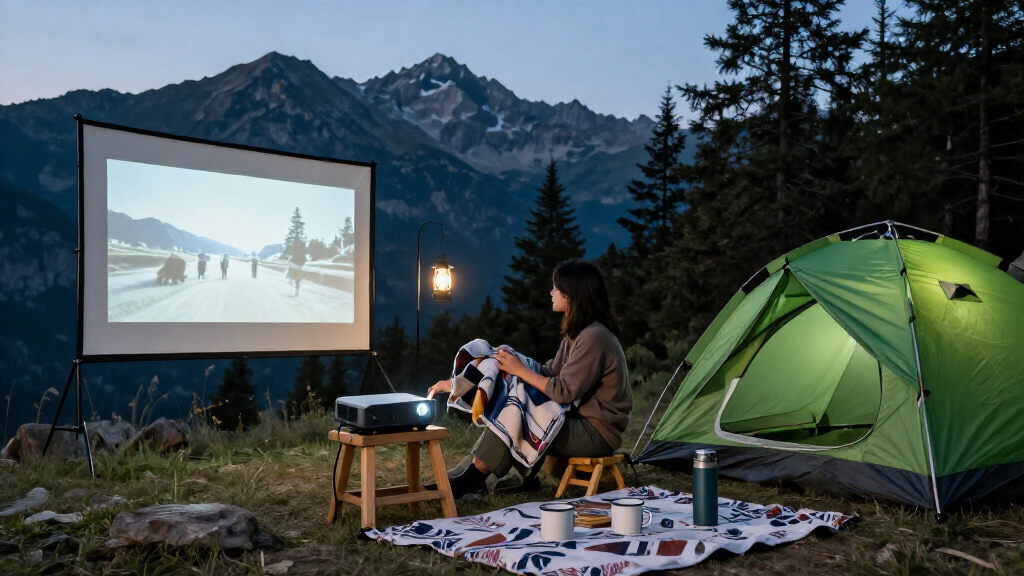
Portable outdoor projectors let you watch films, sports, or other video on a temporary outdoor screen, but they work best after sunset on a smooth, neutral surface. Compare standardized brightness ratings, native resolution, power options, throw distance, sound, and streaming support before you buy, and bring the projector inside after use.
A backyard movie can turn a quiet Tuesday into the sort of night your friends bring up all summer. But a projector that looks dazzling in a dim showroom may struggle against the last blue light of dusk, and a model described as “portable” may still need an outlet.
Portable outdoor projectors are compact projectors designed to make it easier to watch films, sports, or other video on a temporary screen outside. They range from battery-powered mini models to larger units that need mains power, so the label alone tells you little about outdoor performance.
This guide shows you how to match a projector to your light, screen size, viewing distance, and power supply. You’ll also learn what to check about sound, streaming, and weather protection, so your plan holds up when the popcorn is ready and your guests have settled into their chairs.
Plan to watch after sunset; shade and a smaller image can help at dusk, but direct sun usually washes out a large picture.
Compare ANSI or ISO lumen ratings and check native resolution separately from supported input formats.
Measure your projector-to-screen distance and test the intended streaming app, power source, and audio before guests arrive.
Use a smooth, neutral surface and keep the projector stable, dry, and out of walkways.
Bring the projector indoors after use; portable models are not necessarily weatherproof.
What portable outdoor projectors can—and can’t—do
Portable outdoor projectors display a video image on a temporary surface, giving you a bigger picture you can move or pack away. They work best when you can control the light, set the right distance, and keep the projector protected. That flexibility makes them useful for a garden film night, a campsite, or a match on a patio wall, but each setting changes what the projector must deliver. At a campsite, battery life and compact size may matter most; in a garden, an outlet and a larger screen may be easy to arrange.
Portable models vary widely. Some weigh little, run on a built-in battery, and include streaming apps; others are larger “portable” home theater projectors that need mains power and a separate streaming device. A label such as “mini projector” or “smart projector” does not promise a bright outdoor picture. The tradeoff is often between convenience and capability: a small battery-powered unit is easier to place, but may produce a dimmer picture or shorter runtime than a larger model. Check the specifications against the surface and conditions you plan to use.
Think of projection like spreading a pool of light across a wall: the bigger the picture, the more that light spreads out. A 100-inch image might be exciting in a dark yard, while a 70-inch image may hold more contrast at dusk. This matters because dimmer contrast can make dark scenes muddy and fine details harder to distinguish. If you’re planning a neighborhood watch party, test the picture from your real seating distance; a screen that looks impressive up close may be difficult to follow from the back row.
A projector also differs from a TV in daily use. You can move it and create a much larger image, but you usually need low light and a flat surface. A TV is more dependable in daylight because it produces its own light directly, while a projector’s light must compete with the room or sky and reflect off a surface. A projector makes more sense when the event and setting are part of the fun and you can plan around those limits.
Products Worth Considering

Bose QuietComfort True Wireless Earbuds with Active Noise Cancellation, Bluetooth 5.3, USB-C Charging, IPX4, Black

Amazon Kindle Paperwhite (12th Generation, 2024), 16 GB, 7-inch Display, Black

Kindle Paperwhite 16GB (2024 model) – 7 Glare-Free Display – Jade
As an affiliate, we earn on qualifying purchases.
Choose brightness and picture size for your yard
Brightness and ambient light determine whether an outdoor image looks clear or washed out. Compare projector ratings in ANSI lumens or ISO lumens, which give you a more useful basis for comparison than vague “LED lumens” claims. Even a bright consumer model generally gives its best picture after sunset, when the sky stops competing with the screen. In practical terms, more competing light reduces the difference between bright and dark parts of the image, so colors and shadow detail can look flat even when the projector itself is working properly.
Screen size changes the result. The projector spreads its available light over the image, so a larger picture can look dimmer than a smaller one from the same device. If you’re watching a football match in the garden at dusk, try a modest screen size first; the score and players may stay clearer than they would on a huge sheet. This is a useful tradeoff to understand before buying: choosing a smaller image can improve apparent brightness without changing the projector, but it also means less of the wall or screen is used.
Use the manufacturer’s throw ratio and focus range to check whether your chosen spot can create the picture size you want. Throw ratio describes the relationship between projector distance and image width. For instance, before you buy, measure from the shelf to the screen location and compare that distance with the projector’s specifications. This helps avoid a frustrating mismatch: a projector placed too close may not fill a wide screen, while moving it farther back can put it in a walkway or leave too little room for seating. A projector cannot create every size from every position.
Start with the darkest practical viewing time and the smallest comfortable image. You can enlarge the picture after dark if your setup still looks bright and sharp.
“More lumens” is not the whole answer. Screen material, image size, light around the audience, and your expectations all affect what you see. A smooth, neutral screen often gives more consistent results than a bumpy wall or a pale sheet that catches wrinkles like little hills. A reflective or uneven surface can create distracting bright patches and distort the image, so a high brightness rating cannot compensate for every surface problem.
Check native resolution before you trust a 4K label
Native resolution tells you how many pixels the projector actually displays, while a supported input format tells you what signal it can accept. A projector may accept a 4K signal and still show the image at a lower native resolution. If sharp detail matters to you, check both specifications instead of relying on a “4K support” badge. The difference becomes more noticeable as the image grows or when viewers sit close, because the projected pixels occupy more of their field of view.
This difference is easy to spot in a real plan. Imagine you’re streaming a nature film with fine branches and distant birds on a large screen. A model with lower native resolution may soften details even if your streaming stick sends it a 4K signal. For a smaller image viewed from farther away, that loss may be harder to notice, so you may care more about easy setup and battery life than extra pixels. Resolution is most valuable when the screen and seating distance let you see the added detail.
Automatic focus and keystone correction can make setup easier. Autofocus sharpens the image without repeated manual adjustments, while keystone correction digitally reshapes a picture when the projector sits off-center. That convenience has a tradeoff: digital correction uses the projector’s image processing to compensate for poor placement and may reduce usable image detail. A level projector facing the middle of the screen avoids that extra processing and can produce a cleaner result, though it may take more effort to position.
Portable models often advertise higher-resolution inputs alongside LED or laser light sources and automatic adjustment. These features solve different problems: a light source affects brightness and operating characteristics, input support helps with device compatibility, and automatic adjustment can shorten setup. None guarantees a sharp, bright outdoor picture on its own. If you’re comparing models, make a short list of what you’ll actually notice from your chair, such as readable subtitles, clear detail, quick setup, or enough runtime for a full film.
Plan power, streaming, and sound before guests arrive
Power, connection, and audio can make a simple outdoor setup feel effortless—or leave you hunting for adapters in the dark. Battery operation lets you place a projector away from an outlet, but brightness, speaker volume, and video playback can affect runtime. That creates a practical choice: a battery gives you more freedom to place the projector, while mains power can support a longer event without managing remaining charge. Check the maker’s video-playback estimate and which outlets, chargers, or external batteries the unit supports.
Picture a two-hour film night: the projector may run from its built-in battery while your streaming stick and speaker each need their own power. Add a compatible external battery or choose a spot near an outlet, and test the full setup before the evening. A battery estimate for the projector alone may not describe how long all your gear will last, so include every device in the plan. Otherwise, the picture may cut out even though the projector’s advertised runtime seemed long enough.
Some smart models include streaming apps; others need a phone, laptop, console, or streaming stick. Check Wi-Fi support, app availability, and copy-protection compatibility for the service you plan to use. Phone mirroring can be handy for showing vacation photos, but it does not guarantee every streaming service will play. HDMI or another supported wired connection may be more dependable for a film because it avoids relying on wireless mirroring, though it adds a cable and may limit where you can place the source device.
Built-in speakers suit a small, quiet gathering, but outdoor sound disperses quickly and competes with traffic, wind, and conversation. For a larger group, connect a stronger speaker using Bluetooth or a wired output. Bluetooth can keep the setup tidy, while a wired link may avoid pairing problems or audio delay. Check for delay before the event: a late cheer during a live match can make the picture feel out of sync.
Set up a safer, steadier outdoor viewing area
A stable setup and weather protection matter because portable does not mean weatherproof. Keep the projector out of rain, dew, dust, heat, and direct sunlight, and follow its stated operating limits. Bring it indoors after use, even when the night looks clear; moisture can settle quietly as the temperature drops. Exposure can damage electronics or interrupt a screening, so protection is part of planning the location, not just packing up afterward.
Choose a firm surface where people won’t bump the projector, and route cables along an edge rather than across a walking path. For example, if guests carry drinks from the kitchen to the patio, a bright cable stretched between the chairs and screen becomes a trip hazard. Place equipment beside the seating area, then test your path with the lights low. A stable position also helps keep focus and framing consistent if someone brushes past the table.
A proper screen usually gives you a flatter, more even image than a sheet clipped to a fence. A neutral-colored wall can work if it is smooth and clean. Set the screen where nearby lights do not shine straight onto it, and aim the projector squarely at the center. These choices limit glare, unevenness, and digital correction, which can otherwise undermine detail even when the projector’s specifications look suitable.
If children will be near a pool or other water, assign an attentive adult to supervise them closely and keep a clear boundary between the viewing area and water. A movie, speaker, or phone should never distract the supervising adult. Treat water supervision as a separate job, not part of operating the projector.
Use this five-step plan to test your movie-night setup
A quick test before guests arrive can catch problems with brightness, distance, streaming, and sound while there’s still time to fix them. Set up in the same place you’ll use on the night, with the same screen and devices. A five-minute check in daylight won’t tell you everything, because ambient light changes the picture, but a full run-through near the planned viewing time will show whether the setup works under real conditions.
- Pick your viewing time. If you want good contrast, aim for after sunset; shade and a smaller picture can help earlier, but direct sunlight usually defeats a large projected image.
- Measure the projector distance. Compare your available space with the throw ratio, focus range, and image size in the specifications. This confirms the projector can fill the screen without blocking seats or crossing a walkway.
- Connect the source and play a real video. Open the service or file you plan to watch and check that its app, network, connection, and copy protection work. A menu screen alone may not reveal playback restrictions or buffering.
- Run the picture and sound. Focus on a bright scene and a dark scene, then listen from the back seat. Bright and dark scenes reveal different weaknesses: one shows whether the picture holds up, while the other can expose lost shadow detail. Add an external speaker if voices fade outside.
- Check power and pack away. Confirm the projector and accessories have enough runtime, tidy cables, and bring the equipment inside when you finish. Checking the whole setup avoids relying on a projector-only battery estimate.
Take a family film as an example: test a 70-inch picture at dusk, then wait until full dark before enlarging it. If the streaming app stops or the speaker runs flat during the trial, you can switch to a laptop or wired speaker before everyone has claimed a seat. The test also tells you whether the larger image is worth the reduced brightness for your audience.
This simple routine helps you decide whether a projector fits your habits. If you need a bright screen for frequent daytime use, a TV may suit you better. If you enjoy occasional outdoor evenings and can control the light, the setup may be worth the extra few minutes because you can trade some convenience for a much larger shared picture.
Frequently Asked Questions
Can you use a projector outside during the day?
A large image usually looks washed out in direct sunlight. Shade and a smaller picture may help, but dusk or darkness gives you much better contrast. For dependable daytime viewing, a TV is usually the easier choice.
How many lumens do you need for an outdoor projector?
It depends on ambient light, screen size, and how bright you expect the image to look. Compare ratings stated in ANSI or ISO lumens, and treat “LED lumens” claims cautiously because they may not use the same measurement. A smaller image in a dark yard can look more satisfying than a larger one at dusk.
How long does a portable projector battery last?
Runtime varies by model and settings, and brighter playback or louder built-in speakers can affect it. Check the manufacturer’s video-playback estimate or independent measurements, then account for any streaming device and external speaker that need separate power. Test the full arrangement before a long film.
Can you stream Netflix or other services on a portable projector?
Some smart projectors offer built-in streaming apps, while other models need a streaming stick, laptop, or console. Playback depends on current app support, network access, account access, and copy protection. Check the exact service and connection you plan to use before movie night.
Do you need a special outdoor projector screen?
You can project onto a suitable wall, but a flat, neutral surface usually gives a more consistent image than a wrinkled sheet. An outdoor screen can make setup simpler and keep the picture even. Try your chosen surface at the intended distance before inviting a group.
Can you leave a portable projector outside overnight?
Do not assume a portable projector can withstand outdoor weather. Protect it from rain, dew, dust, heat, and direct sunlight, follow the manufacturer’s limits, and bring it inside after use. A clear sky does not prevent dew from settling later.
Conclusion
Choose a projector around the night you actually plan to host: the available light, the screen size, the distance, and the power nearby. Check standardized brightness ratings, native resolution, and app support, then run one complete test with the screen and speaker you’ll use.
When the sky goes dark and the first bright frame settles onto a smooth screen, a patch of backyard can feel like its own little cinema. Start small, get the setup right, and let the picture grow from there.