
TL;DR

Get travel and outdoor gear delivered free with Prime
- Fast, free delivery on millions of items
- Prime Video, Amazon Music and more included
- Member-only deals all year
Building an AI workstation used to be cheaper, but today, prebuilt systems often match or beat DIY costs thanks to market shortages and bulk buying. The choice now depends on your need for speed, support, and customization versus control and flexibility.
Imagine this: your AI project needs a powerful machine fast. You could spend weeks sourcing parts, building, tuning, and troubleshooting. Or, you could buy a prebuilt, ready to run. The big change in 2026? The old rule — that building is always cheaper — no longer holds. Market shortages and bulk buying have flipped the script. Now, your choice isn’t just about saving money, but about speed, support, and control.
Whether you’re a researcher, creator, or small team, understanding the real tradeoffs makes all the difference. This guide cuts through the noise, showing you when building makes sense, when buying saves time, and how to weigh long-term costs. Let’s get into the nitty-gritty.
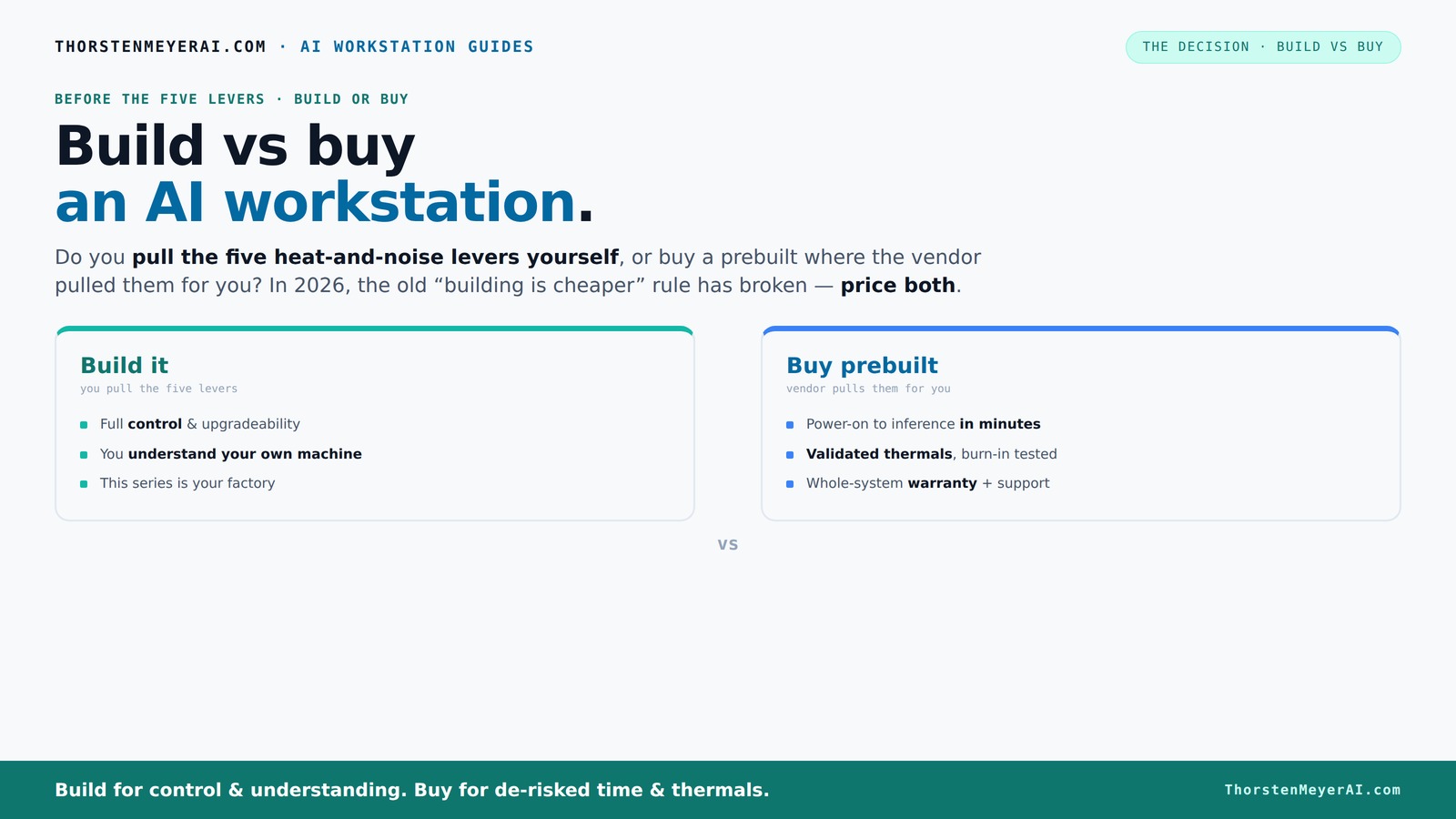
Build vs buy
an AI workstation.
The real question behind this whole series: do you pull the five heat-and-noise levers yourself, or buy a prebuilt where the vendor pulled them for you? And in 2026, the old “building is cheaper” rule has broken. Match your situation in Part 3.
Key Takeaways
- Market shortages in 2026 make prebuilt AI workstations often match or beat DIY costs, especially when factoring in time and support.
- Thermal management is the key to quiet, stable operation; buyers should consider who pulls the levers — vendor or themselves.
- Support, warranties, and validated thermals make prebuilt systems a safer choice for professionals relying on uptime.
- Building offers unmatched control and upgradeability, but requires time, expertise, and willingness to troubleshoot.
- Hybrid approaches—buy the base and upgrade—blend control with convenience, fitting many workloads and budgets.
As an affiliate, we earn on qualifying purchases.
Why 2026 Changes Everything for Build vs Buy
Building your AI system used to cost less, mainly because you could pick parts, assemble them yourself, and upgrade at will. But in 2026, the market has shifted. Component shortages and price spikes for GPUs, DDR5 RAM, and SSDs have made DIY more expensive than ever. Meanwhile, prebuilt vendors bought large quantities early, locking in lower prices and offering systems at competitive rates.
For example, a custom build with high-end GPUs and DDR5 RAM that used to cost around $1,000 now easily hits $1,250 or more. In contrast, prebuilt options from companies like Lambda or Puget often come close to or below that price, with tested thermals and warranties included. So, the old rule — build cheap, buy quick — isn’t true anymore.
This shift means your decision is now a true tradeoff: cost, time, customization, and risk. It’s not just about dollars, but about how fast you get your project off the ground and how much control you want over the hardware.
As an affiliate, we earn on qualifying purchases.
The Heat and Noise: How the Levers Change Your Decision
High-power AI workstations are noisy furnaces. Managing heat and sound relies on five levers: undervolting GPUs, matching coolers, optimizing airflow, tuning fan curves, and proper placement. The choice to build or buy hinges on who pulls these levers.
Buy a prebuilt → the vendor pulls all five levers for you. They validate thermals, run burn-in tests, and often include water-cooling for quieter, cooler operation. For example, Lambda’s systems are tested to run up to 30% cooler and quieter under load, with minimal throttling.
Build it yourself → you control every lever. You choose a quiet GPU, undervolt it (see my guide to undervolt GPU), pick a silent cooler, and optimize airflow with low-noise cases. It’s a puzzle that rewards patience and technical skill, but it’s also where you learn the most about your system’s thermal personality.
In practice, prebuilt systems save you from trial and error, but DIY offers unmatched control. The question: do you want someone else to handle the heat, or do you want to master it yourself?
As an affiliate, we earn on qualifying purchases.
Cost Comparison: Building vs Buying in 2026
| Factor | Build | Buy |
|---|---|---|
| Upfront Cost | Typically lower but rising due to component shortages. Expect $1,250+ for a high-end rig. | Often comparable or slightly higher but includes validation, warranty, and support. |
| Time to Get Running | Several weeks sourcing parts, assembling, and tuning. | Days to weeks, plug-and-play ready. |
| Long-term Costs | Maintenance, upgrades, troubleshooting, and downtime add up. | Support, warranties, and validated thermals reduce hidden costs. |
| Upgrade Flexibility | Easy — swap parts as needed. | More limited; depends on vendor support and system design. |
In 2026, the real story is that prebuilt options often match or beat DIY on total cost of ownership, especially when factoring in time and support. Always price your specific configuration — the difference can surprise you.
As an affiliate, we earn on qualifying purchases.
Choosing the Right GPU and Memory for Your AI Workstation
GPU and RAM are the core of your AI powerhouse. For 2026, aim for at least an NVIDIA RTX 4090 or A100 for demanding training. RAM? 64GB minimum, with 128GB for large datasets or multitasking.
When building, you have the freedom to select the exact models, undervolt for quieter operation, and upgrade later. Check out quiet GPU options to keep noise manageable. For memory, go for DDR5, but be aware that DDR5 prices are high, and availability can vary.
Prebuilt systems often come with validated GPU configs and tested RAM setups. Some vendors even offer customized configurations, but your control over the exact specs is more limited.
Pro tip: always verify the power and cooling compatibility of your GPU choices, especially if you plan multi-GPU setups. The right combination keeps your system stable and cool, avoiding throttling or crashes.
Cooling, Power, and Noise: Why They Matter More Than Ever
Managing heat and noise is critical. A noisy, overheating system can throttle performance or even shut down mid-training. This is why your choice of case, fans, and cooling is more than just aesthetics — it’s performance insurance.
If you build, you can tune everything: select high-quality fans, use quiet case fans, and optimize airflow paths. Pair this with undervolted GPUs and good coolers, and you get a machine that’s both fast and silent.
Prebuilt vendors validate these choices at the factory. They often include custom water-cooling or advanced airflow setups, tested under load. This makes them a safer bet if you want to avoid surprises.
Remember: cooling isn’t just about comfort. It extends hardware lifespan, maintains peak performance, and reduces noise, making your workflow smoother.
Support, Warranty, and Long-Term Reliability
Prebuilt systems shine when it comes to support and warranties. Companies like Puget and Lambda test their machines thoroughly, often running 24–48 hours of burn-in before shipping. They stand behind their work with multi-year warranties, covering parts and labor.
If something goes wrong — a GPU failure or thermal issue — you call support. No need to troubleshoot hardware yourself or source replacement parts. This can save days or weeks, especially during critical AI workloads.
Building your own means managing your repairs, updates, and troubleshooting. While you gain control, you also take on responsibility. If you’re not comfortable with BIOS tweaks or hardware fixes, the risk of downtime increases.
For professionals, uptime and support often outweigh initial savings. It’s the difference between a smooth project and a costly delay.
Upgrade Paths and Future-Proofing
Building your own system generally offers better future-proofing. You can swap out GPUs, add RAM, or upgrade storage as needed. It’s like having a customizable platform that grows with your projects.
Prebuilt systems, however, are more constrained. Some vendors allow upgrades, but often in limited ways. The system’s design might lock you into certain components, making future upgrades more complicated or costly.
Think about your long-term plans. If you expect to scale up or adapt your hardware, a DIY build might be more flexible. But if you want a plug-and-play solution for a few years, a prebuilt can be just as effective.
Hybrid approaches are emerging — buy a solid base and upgrade key components over time, blending control with convenience.
When Does Building Make Sense—and When Does Buying Win?
The decision boils down to your priorities. If you crave control, customization, and a long-term platform, building might be your best bet. It’s perfect for hobbyists, researchers with specific needs, or those who want maximum flexibility.
However, if you value speed, support, and a proven thermal setup, buying a prebuilt makes more sense. It’s ideal for professionals who need to deploy fast, minimize downtime, and avoid the headache of tuning every detail.
In 2026, many find a hybrid approach works best: buy the base system, then tweak or upgrade it for what makes sense. This blends the control of DIY with the reliability of prebuilt systems.
Remember, the right choice depends on your workload, budget, expertise, and timeline. Always get quotes for both options before deciding.
Frequently Asked Questions
Is a prebuilt AI workstation powerful enough for training large models?
Yes, many prebuilt systems in 2026 come with high-end GPUs like the NVIDIA A100 or RTX 4090, capable of training large models efficiently. They are validated for sustained workloads, ensuring you won’t hit thermal throttling or stability issues if you choose a reputable vendor.How much more expensive is a custom build over a prebuilt system over three years?
While initial estimates suggest DIY might be cheaper upfront, hidden costs for maintenance, troubleshooting, and downtime can add up. Over three years, a prebuilt with support and warranty often ends up costing less in total, especially considering the time saved and reduced risk.Can I upgrade a prebuilt workstation later?
It depends on the system design. Some vendors make upgrades straightforward, while others lock you into specific components. Always check with the manufacturer about upgrade paths if you plan to scale or adapt your system in the future.Are prebuilt systems better for stability and warranty support?
Absolutely. Prebuilts are tested thoroughly, often run under load for hours before shipping, and come with warranties. That means less risk of hardware failure and faster support if issues arise, which is critical for ongoing AI projects.When does building your own workstation make the most sense?
Building makes sense if you have specific hardware needs, want maximum control, and are comfortable troubleshooting. It’s ideal for long-term projects, custom configurations, or when you want to learn the inner workings of your AI platform.Conclusion
In the end, your choice hinges on what you value most: speed and support or control and customization. The landscape has shifted so that in 2026, prebuilt systems often match or surpass DIY in total cost and reliability. If you’re in a hurry, the right prebuilt can get you running faster than building from scratch.
But if you love fiddling, want a future-proof platform, or need specific hardware tweaks, building remains a powerful option. Think carefully about your workload, skills, and long-term goals — and choose the path that drives your AI projects forward.
Fall Picks
fall essentials
As an affiliate, we earn on qualifying purchases.