A mesh travel router for an Airbnb can help extend a rental’s Wi-Fi or give your devices one private network, but a travel router is not automatically a mesh system. My best overall pick is the GL.iNet GL-BE3600 Slate 7, whose Wi-Fi 7 and 2.5Gbps Ethernet make it the most capable choice when a wired connection is available. The TP-Link Roam 7 is a strong alternative for newer Wi-Fi 7 devices, while the GL.iNet GL-MT3000 Beryl AX offers a more budget-conscious Wi-Fi 6 option. The main tradeoffs are mesh compatibility, ease of connecting to a rental’s existing Wi-Fi, and how much speed and setup complexity you actually need. Read on for the full breakdown and guidance on choosing a router that fits your stay.

Get travel and outdoor gear delivered free with Prime
- Fast, free delivery on millions of items
- Prime Video, Amazon Music and more included
- Member-only deals all year
Complete the kit


Key Takeaways
- The Slate 7 leads for capability: Wi-Fi 7 and 2.5Gbps Ethernet give it an advantage for newer devices and wired Airbnb connections, though its extra features may be unnecessary for basic browsing.
- The Roam 7 is another Wi-Fi 7 contender, while the Slate 7’s 2.5Gbps Ethernet gives buyers a clearer reason to choose it when a rental offers a suitable wired port.
- The Beryl AX is the value-oriented Wi-Fi 6 pick: it can suit everyday travel needs without requiring buyers to pay for the newest wireless generation.
- Mesh-ready does not mean a complete mesh kit: the white dual-band router’s compatibility claim should not be mistaken for proof that it will pair with any mesh brand or work as a wireless repeater.
- The lineup covers very different needs: the newer GL.iNet Wi-Fi 7 models prioritize capability, while the Opal and Roam 6 are simpler-generation options for travelers who can accept fewer performance headroom.
| TP-Link Roam 7 BE3600 Wi-Fi 7 Portable Travel Router |  | Best Overall for Simple Shared Stays | Wi-Fi standard: Wi-Fi 7 | Wireless bands: Dual-band 2.4 GHz and 5 GHz; no 6 GHz | Maximum wireless speed: Up to 2882 Mbps on 5 GHz and 688 Mbps on 2.4 GHz | VIEW ON AMAZON | See Our Full Breakdown |
| GL.iNet GL-BE3600 Slate 7 Wi‑Fi 7 Travel Router with Touchscreen and 2.5 Gbps Ethernet |  | Best for Beginners Who Want On-Device Controls | Model: GL-BE3600 | Wi-Fi standard: Wi-Fi 7 (802.11.be) | Frequency bands: Dual-band 2.4 GHz and 5 GHz | VIEW ON AMAZON | See Our Full Breakdown |
| GL.iNet GL-MT3600BE Beryl 7 Dual-Band Wi-Fi 7 Travel Router |  | Best for Many Devices and VPN Throughput | Model: GL-MT3600BE | Wi-Fi generation: Wi-Fi 7 | Frequency bands: Dual-band 2.4 GHz and 5 GHz | VIEW ON AMAZON | See Our Full Breakdown |
| Compact Dual-Band WiFi Router, White, Mesh-Ready, Travel-Friendly, Starlink V4/Gen3 Compatible |  | Best for Mesh Expansion | Wireless bands: 2.4 GHz and 5 GHz | Design: Compact, travel-friendly; white | Compatibility: Starlink V4/Gen3 and standard ISPs | VIEW ON AMAZON | See Our Full Breakdown |
| GL.iNet GL-MT3000 Beryl AX Wi-Fi 6 Travel Router | 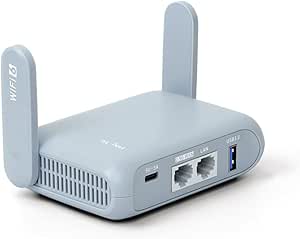 | Best Value Wi-Fi 6 Pick | Wi-Fi generation: Wi-Fi 6 | Frequency bands: Dual-band 2.4 GHz and 5 GHz | Wireless speeds: 574 Mbps on 2.4 GHz and 2402 Mbps on 5 GHz | VIEW ON AMAZON | See Our Full Breakdown |
| GL.iNet GL-AXT1800 Slate AX Wi-Fi 6 Travel Router with VPN |  | Best for VPN and Larger Groups | Wi-Fi standard: Wi-Fi 6 (802.11ax) | Wi-Fi speed: Up to 1800 Mbps: 600 Mbps on 2.4 GHz and 1200 Mbps on 5 GHz | Bands: Dual-band | VIEW ON AMAZON | See Our Full Breakdown |
| GL.iNet GL-SFT1200 Opal AC1200 Dual-Band Travel Router | 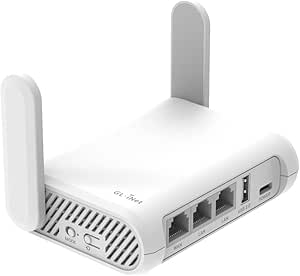 | Best Lightweight Value | Wi-Fi standard: Wi-Fi 5 (802.11a/b/g/n/ac) | Wireless data rate: Up to 1200 Mbps | 2.4 GHz speed: Up to 300 Mbps | VIEW ON AMAZON | See Our Full Breakdown |
| Roam 6 AX1500 Portable Wi‑Fi 6 Travel Router, Dual‑Band, USB‑C, 3.0 |  | Best for Easy Setup and USB-C Power | Wi-Fi standard: Wi-Fi 6 (802.11ax) | Maximum speed: 1201 Mbps on 5 GHz and 300 Mbps on 2.4 GHz | Device capacity: Up to 60 devices | VIEW ON AMAZON | See Our Full Breakdown |
| mesh travel router for airbnb | Wi-Fi standard | Ethernet ports |
|---|---|---|
| TP-Link Roam 7 BE3600 Wi-Fi 7 | Wi-Fi 7 | — |
| GL.iNet GL-BE3600 Slate 7 Wi‑F | Wi-Fi 7 (802.11.be) | 2 × 2.5 Gbps (1 WAN, 1 LAN) |
| GL.iNet GL-MT3600BE Beryl 7 Du | — | 2 × 2.5G (1 WAN, 1 LAN) |
| Compact Dual-Band WiFi Router | — | — |
| GL.iNet GL-MT3000 Beryl AX Wi- | — | 2.5G WAN and 1 Gbps LAN |
| GL.iNet GL-AXT1800 Slate AX Wi | Wi-Fi 6 (802.11ax) | — |
| GL.iNet GL-SFT1200 Opal AC1200 | Wi-Fi 5 (802.11a/b/g/n/ac) | 2 Gigabit LAN and 1 Gigabit WAN |
| Roam 6 AX1500 Portable Wi‑Fi 6 | Wi-Fi 6 (802.11ax) | 1 Gbps WAN/LAN and 1 Gbps LAN |
More Details on Our Top Picks
TP-Link Roam 7 BE3600 Wi-Fi 7 Portable Travel Router
The TP-Link Roam 7 makes the most sense for Airbnb guests who want to turn the rental’s Wi-Fi, Ethernet, or a phone’s USB tether into one private network for their devices. Its five operating modes and capacity for up to 90 devices offer more flexibility than a basic travel access point, while the 2.5 Gbps WAN port can accommodate a fast wired connection when the rental provides one. Compared with the GL.iNet Slate 7, setup is less focused on touchscreen controls and OpenWrt customization, but the Roam 7 still includes WireGuard and OpenVPN support. Its main limitation is shared by most travel routers: it needs an existing internet source and cannot connect directly through SIM or eSIM. It also lacks 6 GHz Wi-Fi, so Wi-Fi 7 here does not mean tri-band coverage.
Pros:- Can create a private network from public Wi-Fi, Ethernet, or USB tethering.
- Five operating modes suit rentals with different connection setups.
- Supports up to 90 connected devices.
- 2.5 Gbps WAN, USB 3.0, and WireGuard and OpenVPN support add connection and privacy options.
Cons:- Requires an external internet source and has no SIM or eSIM support.
- Dual-band only, with no 6 GHz band.
- Does not support OpenWrt for users seeking deeper firmware customization.
Best for: Airbnb guests who want an easy-to-adapt private network for several phones, laptops, and smart devices using the rental’s Wi-Fi, Ethernet, or USB tethering.
Not ideal for: Travelers who need internet without relying on the rental or a tethered device, or who specifically want 6 GHz Wi-Fi or OpenWrt customization.
- Wi-Fi standard:Wi-Fi 7
- Wireless bands:Dual-band 2.4 GHz and 5 GHz; no 6 GHz
- Maximum wireless speed:Up to 2882 Mbps on 5 GHz and 688 Mbps on 2.4 GHz
- Maximum connected devices:90
- Ports:1 × 2.5 Gbps WAN, 1 × 1 Gbps LAN, USB 3.0, USB-C power
- Operating modes:Router, Hotspot, Access Point, Range Extender, Client
- VPN protocols:OpenVPN, WireGuard, PPTP, L2TP
- Power:USB-C; included adapter or 5V PD power source
- SIM/eSIM support:Not supported
Our verdict“Choose the Roam 7 for a flexible, straightforward private network in an Airbnb, provided you already have a source of internet.”
GL.iNet GL-BE3600 Slate 7 Wi‑Fi 7 Travel Router with Touchscreen and 2.5 Gbps Ethernet
The Slate 7 is the clearest fit for Airbnb guests who want to manage a private network without relying on a phone app for every adjustment. Its touchscreen handles QR-code setup, VPN toggling, and live monitoring, making common tasks easier to see and access than on the app-controlled Beryl 7. Two 2.5 Gbps Ethernet ports also give it a useful edge when a rental has a wired connection and a device that benefits from a wired link. OpenWrt 23.05, WPA3, and encrypted DNS provide more control than the Roam 7, but that flexibility may be unnecessary for guests who only want a quick connection. It needs an external power adapter, and its 512 MB storage can constrain added packages. Like the other routers here, it does not provide internet on its own.
Pros:- Touchscreen provides direct access to QR setup, VPN controls, and network monitoring.
- Two 2.5 Gbps Ethernet ports support a fast wired WAN connection and wired LAN device.
- OpenWrt 23.05 supports customization and additional packages.
- Includes OpenVPN, WireGuard, WPA3, and DNS over HTTPS/TLS.
Cons:- Requires external power; battery power is not included.
- 512 MB of storage may limit how many extra packages can be installed.
- Needs an existing internet connection rather than providing cellular service.
Best for: Airbnb travelers who want visible, on-device setup and VPN controls, plus the option to customize an OpenWrt-based network.
Not ideal for: Guests prioritizing battery-powered portability or a minimal, no-settings setup; it needs an external adapter and its advanced software options may be more than they need.
- Model:GL-BE3600
- Wi-Fi standard:Wi-Fi 7 (802.11.be)
- Frequency bands:Dual-band 2.4 GHz and 5 GHz
- Maximum wireless speed:688 Mbps on 2.4 GHz and 2882 Mbps on 5 GHz
- Ethernet ports:2 × 2.5 Gbps (1 WAN, 1 LAN)
- USB:USB 3.0
- Memory and storage:2 GB RAM, 512 MB storage
- Operating system:OpenWrt 23.05, Kernel 5.4.213
- VPN support:OpenVPN and WireGuard
Our verdict“Pick the Slate 7 if you want a travel router with approachable touchscreen controls and the option to customize its network.”
GL.iNet GL-MT3600BE Beryl 7 Dual-Band Wi-Fi 7 Travel Router
For a shared Airbnb where several people bring laptops, phones, and streaming devices, the Beryl 7 combines Wi-Fi 7 with a stated capacity of up to 120 devices. That gives it a higher listed device ceiling than the Roam 7, while its two 2.5G Ethernet ports and USB 3.0 provide useful connection options beyond wireless. It also stands out for stated VPN throughput—up to 1100 Mbps with WireGuard—where the older Beryl AX is a more modest Wi-Fi 6 choice with lower listed VPN speeds. OpenWrt, encrypted DNS, and a configurable physical switch suit travelers who want control, though the switch has no purpose until configured in the admin panel. The Beryl 7 is app-controlled, not touchscreen-led like the Slate 7, and it still depends on the rental’s internet connection.
Pros:- Supports up to 120 connected devices.
- Two 2.5G Ethernet ports and USB 3.0 provide flexible wired and peripheral connections.
- Supports WireGuard and OpenVPN client and server features, with stated VPN speeds up to 1100 Mbps for WireGuard.
- Includes OpenWrt, WPA3, encrypted DNS, and a configurable physical toggle.
Cons:- Physical toggle needs to be assigned a function in the admin panel first.
- VPN subscriptions may be required for third-party VPN services.
- Real-world speeds depend on the available internet connection and network setup.
Best for: Groups sharing an Airbnb who need one private network for many devices and want OpenWrt and VPN features.
Not ideal for: Travelers who prefer on-device touchscreen controls, want a ready-to-use physical shortcut without configuration, or need internet without an external source.
- Model:GL-MT3600BE
- Wi-Fi generation:Wi-Fi 7
- Frequency bands:Dual-band 2.4 GHz and 5 GHz
- Wireless speed:688 Mbps on 2.4 GHz and 2882 Mbps on 5 GHz
- Ethernet ports:2 × 2.5G (1 WAN, 1 LAN)
- Maximum connected devices:120
- VPN speed:Up to 1100 Mbps (WireGuard); 1000 Mbps (OpenVPN-DCO)
- Operating system:OpenWrt 21.02, Kernel 5.4.281
- Memory and storage:512 MB RAM, 512 MB storage
Our verdict“Choose the Beryl 7 for a device-heavy Airbnb group that values VPN capability and network control over touchscreen simplicity.”
Compact Dual-Band WiFi Router, White, Mesh-Ready, Travel-Friendly, Starlink V4/Gen3 Compatible
This compact router is the lineup’s most direct match for an Airbnb guest focused on extending coverage with mesh, rather than creating a private network from public Wi-Fi. It supports dual-band 2.4 GHz and 5 GHz connections, works with Starlink V4/Gen3 and standard ISPs, and is described as plug-and-play. That makes it a better fit for a rental with a compatible wired internet setup and a dead zone than the TP-Link Roam 7, whose strengths are travel modes and converting existing connections into a private network. The tradeoff is that the supplied details do not list wireless speed, device capacity, Ethernet ports, VPN support, or the mesh system’s expansion requirements. Its small size also may limit range, so it is less reassuring as a stand-alone answer to a large or multi-room rental.
Pros:- Mesh-ready design can support broader coverage when expanded.
- Compact, travel-friendly form is easier to pack than a full-size home router.
- Compatible with Starlink V4/Gen3 and standard ISPs.
- Plug-and-play setup is intended to reduce configuration steps.
Cons:- Small form factor may limit range compared with larger routers.
- Product data does not specify wireless speeds, Ethernet ports, or maximum device capacity.
- No VPN, public-Wi-Fi conversion, or SIM/eSIM support is listed.
Best for: Travelers staying in a compatible rental with an existing ISP or Starlink connection who want a compact router that can be expanded into mesh coverage.
Not ideal for: Guests who need to create a private network from captive-portal public Wi-Fi, need VPN features, or want documented speed and port specifications before choosing.
- Wireless bands:2.4 GHz and 5 GHz
- Design:Compact, travel-friendly; white
- Compatibility:Starlink V4/Gen3 and standard ISPs
- Mesh support:Mesh-ready
- Setup:Plug-and-play
- Wireless speed:Not specified in the provided product data
Our verdict“Choose this model when mesh expansion and Starlink compatibility matter more than travel-router features such as VPN or public-Wi-Fi sharing.”
GL.iNet GL-MT3000 Beryl AX Wi-Fi 6 Travel Router
The Beryl AX is the practical choice for Airbnb travelers who want a capable private network and VPN tools without needing the newest Wi-Fi generation. It offers OpenWrt, WPA3, encrypted DNS, and both OpenVPN and WireGuard client and server functions, alongside a 2.5G WAN port for a wired rental connection. Compared with the Wi-Fi 7 Beryl 7, it has lower listed wireless and VPN speeds and fewer high-end connections; its stated VPN maximum is 150 Mbps for OpenVPN and 300 Mbps for WireGuard. That makes it better suited to ordinary travel use than demanding, high-throughput VPN workloads. The physical feature toggle also needs configuration before it can help. For guests who value compactness and privacy features more than Wi-Fi 7 or a high device ceiling, this older-generation model is the more restrained fit.
Pros:- Compact travel design with a 2.5G WAN port, gigabit LAN, and USB 3.0.
- Supports OpenVPN and WireGuard client and server functions.
- OpenWrt firmware offers network configuration options.
- WPA3 and DNS over HTTPS/TLS add security features.
Cons:- Wi-Fi 6 rather than Wi-Fi 7, with lower listed wireless speeds than the Beryl 7.
- Maximum listed VPN speeds are 150 Mbps for OpenVPN and 300 Mbps for WireGuard.
- Physical feature toggle must be configured in the admin panel before use.
Best for: Solo travelers or couples who want a compact OpenWrt router with VPN and encrypted DNS for everyday Airbnb browsing and streaming.
Not ideal for: Large groups, users seeking Wi-Fi 7, or travelers who need high VPN throughput for demanding transfers.
- Wi-Fi generation:Wi-Fi 6
- Frequency bands:Dual-band 2.4 GHz and 5 GHz
- Wireless speeds:574 Mbps on 2.4 GHz and 2402 Mbps on 5 GHz
- Ethernet ports:2.5G WAN and 1 Gbps LAN
- USB:USB 3.0
- VPN support:OpenVPN and WireGuard; up to 150 Mbps OpenVPN and 300 Mbps WireGuard
- Firmware:OpenWrt 21.02
- Security:WPA2-PSK, WPA3, DNS over HTTPS, DNS over TLS
- RAM and power:64 MB RAM; 5 V
Our verdict“Pick the Beryl AX if compact size and VPN features matter more than Wi-Fi 7 speeds or high-throughput VPN performance.”
GL.iNet GL-AXT1800 Slate AX Wi-Fi 6 Travel Router with VPN
For an Airbnb stay where several people need a private network, the Slate AX pairs Wi-Fi 6 with support for up to 120 connected devices—the largest stated capacity among these three picks. Its repeater mode can share a public or hotel connection, while OpenVPN and WireGuard offer more flexibility for travelers who want VPN protection at the router. USB-based SAMBA and WebDAV sharing can also make files available across the network. Compared with the lighter GL.iNet GL-SFT1200 Opal, this model offers Wi-Fi 6 and much higher stated device capacity, but is a more feature-heavy choice. The tradeoffs are the admin setup needed before the physical toggle works and the possibility of reconnecting when a public Wi-Fi session expires.
Pros:- Wi-Fi 6 with stated combined speeds up to 1800 Mbps
- Supports up to 120 connected devices
- OpenVPN and WireGuard support, with public Wi-Fi repeater mode
- USB-drive file sharing via SAMBA and WebDAV
Cons:- Physical toggle switch needs configuration in the admin panel before use
- Public Wi-Fi time limits can require reconnecting the router
- Its broad feature set may mean more setup than a basic travel router
Best for: Families or groups sharing an Airbnb who want Wi-Fi 6, router-level VPN options, and a private network for many devices.
Not ideal for: Travelers who want the simplest plug-and-go setup or do not need advanced VPN, file-sharing, or high-capacity features.
- Wi-Fi standard:Wi-Fi 6 (802.11ax)
- Wi-Fi speed:Up to 1800 Mbps: 600 Mbps on 2.4 GHz and 1200 Mbps on 5 GHz
- Bands:Dual-band
- Maximum connected devices:120
- VPN:OpenVPN and WireGuard
- Operating system:OpenWrt 21.02
- Ports:3; LAN bandwidth up to 1000 Mbps
- File sharing:SAMBA and WebDAV via external USB drive
Our verdict“Choose the Slate AX for a group Airbnb stay when high device capacity and built-in VPN options matter more than the simplest setup.”
GL.iNet GL-SFT1200 Opal AC1200 Dual-Band Travel Router
The Opal AC1200 suits Airbnb travelers who want a small router to turn shared or public Wi-Fi into a private network without carrying a more elaborate setup. At 145 g, it is the lightest of these three options with a stated weight, and its retractable antennas fold away for packing. Three gigabit Ethernet ports give it a practical advantage when a rental has wired internet or a device that benefits from Ethernet. It also includes OpenVPN and WireGuard, features the compact Roam 6 lists as well. Unlike the Wi-Fi 6 Slate AX and Roam 6, the Opal uses Wi-Fi 5, so it is a better fit for modest browsing and streaming needs than a crowded stay with many newer devices. Its switch also needs advance configuration.
Pros:- Lightweight 145 g design with retractable antennas
- Three gigabit Ethernet ports, including WAN
- OpenVPN and WireGuard support
- Can repeat public Wi-Fi to create a private network
Cons:- Wi-Fi 5 rather than Wi-Fi 6
- Does not support easytethering
- Physical toggle switch must be configured before use
Best for: Solo travelers or couples who want a lightweight private Wi-Fi network for an Airbnb and value Ethernet ports and VPN support.
Not ideal for: Groups seeking Wi-Fi 6 or high device capacity, and travelers who rely on easytethering, which this model does not support.
- Wi-Fi standard:Wi-Fi 5 (802.11a/b/g/n/ac)
- Wireless data rate:Up to 1200 Mbps
- 2.4 GHz speed:Up to 300 Mbps
- 5 GHz speed:Up to 867 Mbps
- Ethernet ports:2 Gigabit LAN and 1 Gigabit WAN
- Weight:145 g
- VPN protocols:OpenVPN and WireGuard
- Antennas:2 retractable
Our verdict“Pick the Opal for a light, practical travel kit when Wi-Fi 5 is sufficient and wired ports matter more than newer wireless performance.”
Roam 6 AX1500 Portable Wi‑Fi 6 Travel Router, Dual‑Band, USB‑C, 3.0
The Roam 6 AX1500 is a strong match for Airbnb guests who want current-generation Wi-Fi without taking on OpenWrt configuration. Its Tether app or web interface provides a straightforward setup path, while USB-C power lets travelers use the included adapter or a compatible power bank. Two gigabit ports help connect a wired device or accommodate different WAN/LAN needs, and router, access point, repeater, and client modes give it flexibility across rental networks. Compared with the Slate AX, it has a lower stated device limit of 60 and fewer listed ports, but its app-led setup and USB-C input may be more convenient for a simple travel kit. The main drawback for customization-minded buyers is that it does not support OpenWrt.
Pros:- Wi-Fi 6 with up to 1201 Mbps on 5 GHz
- Tether app or web interface for setup
- USB-C power input supports a compatible power bank
- OpenVPN and WireGuard support with two gigabit ports
Cons:- Does not support OpenWrt or its firmware customization options
- Stated device capacity is 60, below the Slate AX’s 120
- Only two Ethernet ports are listed, fewer than the Opal’s three
Best for: Travelers who want Wi-Fi 6, VPN support, USB-C power, and app-guided setup for a rental network.
Not ideal for: OpenWrt enthusiasts or larger groups who need the Slate AX’s higher stated device capacity.
- Wi-Fi standard:Wi-Fi 6 (802.11ax)
- Maximum speed:1201 Mbps on 5 GHz and 300 Mbps on 2.4 GHz
- Device capacity:Up to 60 devices
- Ethernet ports:1 Gbps WAN/LAN and 1 Gbps LAN
- Power input:USB-C, 5V/3A PD
- VPN support:OpenVPN and WireGuard
- Operating modes:Router, AP/RE/Client
- Setup:Tether app or web interface
Our verdict“Choose the Roam 6 if easy setup and USB-C powering matter more than OpenWrt customization or the Slate AX’s higher device capacity.”

How We Picked
I ranked these options around the practical demands of an Airbnb stay: connecting to a rental’s available internet, creating a consistent network for personal devices, portability, and the likelihood that setup can be handled without specialized networking knowledge. I gave weight to wireless generation and Ethernet capability, but treated specifications as potential advantages rather than guarantees of real-world speed; the host’s service, building layout, and router placement still matter.
Mesh suitability received particular scrutiny because a travel router and a mesh system do different jobs. A product’s mesh-ready label alone does not establish compatibility with a particular mesh kit, nor does it promise that the router can wirelessly extend a host’s network. I ranked the Slate 7 and Roam 7 highest for modern connectivity, favored the Beryl AX for buyers who want a more measured Wi-Fi 6 choice, and placed older or less fully specified options lower when buyers may face more uncertainty about capabilities or fit.
| mesh travel router for airbnb | Wi-Fi standard |
|---|---|
| TP-Link Roam 7 BE3600 Wi-Fi 7 | Wi-Fi 7 |
| GL.iNet GL-BE3600 Slate 7 Wi‑F | Wi-Fi 7 (802.11.be) |
| GL.iNet GL-MT3600BE Beryl 7 Du | — |
| Compact Dual-Band WiFi Router | — |
| GL.iNet GL-MT3000 Beryl AX Wi- | — |
| GL.iNet GL-AXT1800 Slate AX Wi | Wi-Fi 6 (802.11ax) |
| GL.iNet GL-SFT1200 Opal AC1200 | Wi-Fi 5 (802.11a/b/g/n/ac) |
| Roam 6 AX1500 Portable Wi‑Fi 6 | Wi-Fi 6 (802.11ax) |
Factors to Consider When Choosing Mesh Travel Router For Airbnb
Choosing a router for a rental starts with the internet and layout the host actually provides, not the largest number on a product listing. These points help separate a useful travel setup from gear that adds cost, configuration, or compatibility questions without solving the problem.
Check What “Mesh” Means Before Buying
Mesh usually describes multiple coordinated access points, while a travel router is often a single device that creates a network or shares an existing connection. Some products can work with specific mesh equipment, but that does not mean they can join every brand’s system or act as a wireless satellite. Ask whether your goal is to improve coverage inside your rental, reuse one network name for your devices, or connect to a separate mesh kit you already own. Those are different jobs and may call for different hardware. Check the manufacturer’s exact supported modes and compatible models before relying on a “mesh-ready” label.
Find Out Whether the Rental Has Ethernet
A wired Ethernet port can make setup more predictable than trying to repeat a host’s Wi-Fi, especially when the router can use that connection as its internet source. Before arrival, ask the host whether Ethernet is available, active, and accessible where you plan to stay. Also check whether the port is near a useful location; a fast wired link is less helpful if the router must sit far from your devices. If there is no Ethernet, confirm that the travel router supports the Wi-Fi sharing or repeater mode you intend to use. Do not assume a faster port will improve internet service that is already slow at the property.
Plan for Captive Portals and Guest Wi-Fi Rules
Many rentals use a sign-in page, access code, or device approval step before internet access begins. A router may be able to share a connection after the login is completed, but portal behavior varies, and some networks restrict shared connections. Ask the host how guests connect and whether personal routers are allowed. If you need to authorize the router through a browser page, check the device’s setup process before travel rather than learning it during a late arrival. A router cannot bypass a property’s access controls or turn a restricted connection into an authorized one.
Match Wi-Fi Generation to Your Actual Devices
Wi-Fi 7 models such as the Slate 7, Roam 7, and Beryl 7 offer newer wireless capability, but compatible client devices and a suitable internet connection are needed to benefit from it. For ordinary browsing, video calls, and streaming on a small group of devices, a Wi-Fi 6 router may already be a sensible fit. Older Wi-Fi 5 options can still serve basic travel use, though they offer less headroom for newer devices and busy households. Consider how many people will share the network and what they do at the same time. Paying for a newer standard makes more sense when your devices and connection can use it, not simply because it is the newest label.
Choose a Setup You Can Manage on Arrival
Travel routers can involve changing operating modes, joining a host network, and sometimes configuring a VPN or cloned network name. A screen or a clear setup flow may help, but it does not remove the need to understand the property’s connection method. If you only want to connect phones and laptops to one private network, prioritize a straightforward routine over advanced settings you will not use. More control can be worthwhile for travelers who need VPN features or regularly manage multiple connections. Save setup instructions offline and test the basic process at home, where you can troubleshoot without a check-in deadline.
Consider Placement, Power, and Permission
A small router still needs a useful spot and a reliable power source. A device placed beside a TV cabinet or behind thick walls may not improve coverage where you need it, and a travel router cannot compensate for a poor connection coming into the unit. Check the power requirements and included accessories, then plan where the router can sit without blocking airflow or creating a trip hazard. Ask the host before attaching equipment to their network or changing any existing settings. For a short stay with good existing Wi-Fi, adding hardware may create more setup work than benefit.
Frequently Asked Questions
Will any of these routers create a mesh network with the Airbnb’s existing Wi-Fi?
Not automatically. A travel router may share an existing Wi-Fi connection or create its own network, but those functions are not the same as joining a mesh system. Mesh pairing often depends on supported models, software, and a matching ecosystem, so check the exact manufacturer documentation before buying for that purpose. If your main goal is better signal in one room, ask the host about the existing system or consider whether a wired connection and a separate access point are possible. Do not rely on the phrase “mesh-ready” alone.
Can I use a travel router if the Airbnb Wi-Fi requires a login page?
Often the connection can be shared after an initial sign-in, but captive portals vary and some networks limit routers or multiple devices. Confirm the property’s connection process with the host and check that your chosen router supports the mode you need. You may have to complete the login through a connected phone or laptop before other devices get internet access. A router does not remove the need to accept terms, enter an access code, or follow network restrictions. If the host uses device registration, ask whether a personal router can be registered.
Is Wi-Fi 7 worth choosing for a short rental stay?
It can be worthwhile if your devices support Wi-Fi 7, you expect several people to share the network, or you want more headroom for future trips. It is less compelling when the Airbnb’s internet plan is modest or your devices are older, since the connection and clients limit the benefit. The Slate 7 and Roam 7 stand out for this newer generation, but the Wi-Fi 6 Beryl AX may be a more proportionate choice for routine travel. Compare the whole setup rather than treating the generation label as a promise of faster internet. The building’s signal and host-provided service can matter more than the router standard.
Should I buy a travel router or bring a mesh kit to fix weak coverage?
A travel router is generally easier to pack and can give your devices a shared network, but one unit may not cover a large or divided rental. A mesh kit can spread coverage across multiple rooms, though it requires more equipment, placement, setup, and permission to connect to the property’s network. First ask the host whether the weak area can be addressed by moving the existing router or using an available Ethernet port. If the rental has no wired backhaul and blocks extra equipment, adding mesh nodes may not solve the underlying issue. Choose based on the coverage problem you can actually control.
Do I need a VPN router for Airbnb travel?
A VPN-capable router can be useful if you want supported devices to use a VPN connection without configuring each one separately. It can also add setup steps and may reduce throughput depending on the VPN service, router, and connection quality. For occasional browsing on personal devices, installing a VPN app on each device may be simpler. If you rely on a VPN for work, check that the router supports your provider and preferred protocol before travel. A VPN does not guarantee privacy from every network risk or replace careful handling of sensitive accounts.
Conclusion
For most travelers seeking a capable all-rounder, I recommend the GL.iNet GL-BE3600 Slate 7, especially when Wi-Fi 7 support and 2.5Gbps Ethernet are useful. The best value in this lineup is the GL.iNet GL-MT3000 Beryl AX for buyers who want a modern Wi-Fi 6 travel option without prioritizing Wi-Fi 7. For a premium, newer-generation choice, compare the Slate 7 with the TP-Link Roam 7; the Slate 7 makes more sense when its Ethernet capability matters, while the Roam 7 is a solid alternative for Wi-Fi 7-focused travel. Beginners should favor the model whose connection modes and setup instructions match the host’s network, rather than assuming a touchscreen or simple label will resolve every captive portal. For specific needs, consider the GL.iNet VPN models if you need router-level VPN support, and treat the mesh-ready white router as a candidate only after confirming compatibility with your intended mesh equipment. Before choosing any of them, verify the Airbnb’s network rules and available connection type.