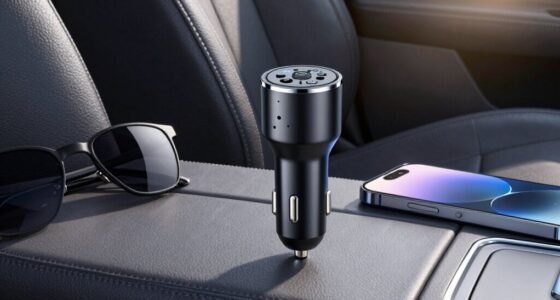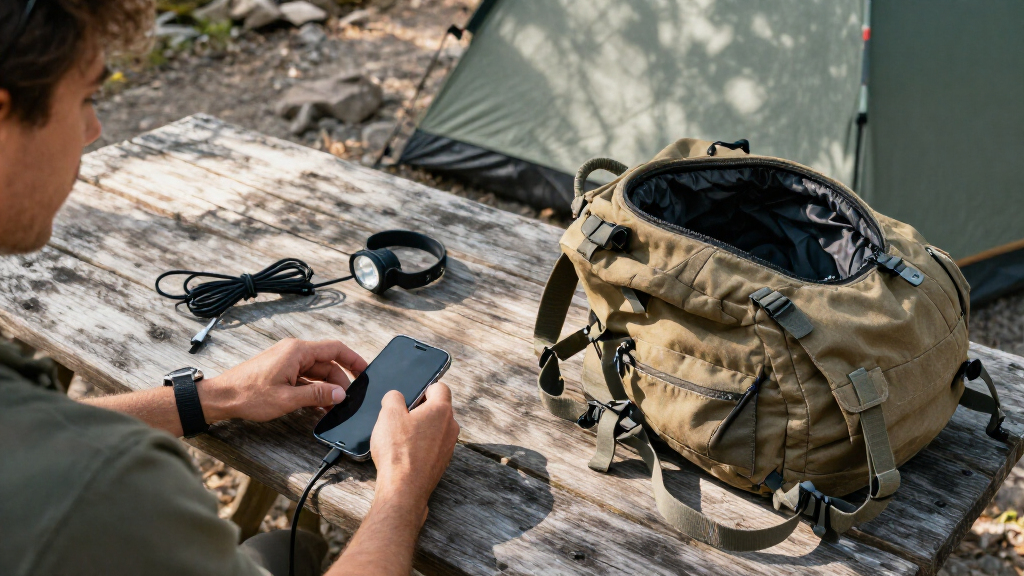
This checklist is for travelers who want a practical way to keep essential devices charged on the go, whether they’re packing light or bringing several kinds of charging gear. Start with the items that match the devices you carry and the places you plan to use them; your actual charging needs should guide the list.

Get travel and outdoor gear delivered free with Prime
- Fast, free delivery on millions of items
- Prime Video, Amazon Music and more included
- Member-only deals all year
The sections move from portable power and solar charging to adapters, cables, a power strip, and a rechargeable headlamp. Each slot names a specific pick and gives you a quick way to assess whether it fits your setup. Check the connections your devices use before choosing supporting gear.
Use the checklist as a planning aid, not a reason to pack every item. Consider how many devices need power, whether you’ll have access to outlets, and how much gear you’re comfortable carrying. Pack for your itinerary, then confirm that cables and adapters work with the devices you’re bringing.
Power Banks
A power bank can help keep portable devices charged when you’re away from an outlet. The Anker 25,000mAh Power Bank with 165W Output and Built-In Cables puts capacity, output, and cables in its product name, so it’s a useful candidate if you want those features together. Think through which devices you’ll charge and how often before deciding whether this slot belongs on your checklist. Match the bank to your devices and expected use.
A common buying mistake is assuming that a large capacity or high output automatically makes a power bank the right fit. Check your devices’ charging connections and requirements, and confirm that the built-in cables are compatible with what you carry. Consider whether the bank’s size and weight work for your bag, too. If you already pack cables you prefer, built-in ones may not change your setup much. Verify cable compatibility before relying on an all-in-one option.
What to look for:
- Confirm its built-in cables match your devices’ ports.
- Check device charging requirements against the listed output.
- Consider whether its size and weight suit your bag.
- Think about how many devices you expect to charge.
- Check whether built-in cables replace or supplement your usual kit.
Anker 25,000mAh Power Bank with 165W Output and Built-In Cables

This rechargeable 25,000mAh power bank has three USB-C ports rated up to 100W each, a USB-A port, and two built-in USB-C cables for charging up to four devices. It supports laptops and mobile devices, recharges in about two hours with a 100W or higher charger, and complies with the 100Wh airline carry-on limit.
Pros:
- Can charge up to four devices at once
- Three USB-C ports support up to 100W each
- Two built-in cables reduce the need to carry separate cables
- Airline carry-on friendly under the stated 100Wh limit
Cons:
- Wall charger is not included
- The extendable cable reaches up to 2.3 ft
Best for: Travelers who want built-in cables and portable power in one item.
Not ideal for: Packers whose devices need connections the built-in cables don’t provide.
Bottom line: Choose it if its built-in cables and listed output fit the devices you plan to carry.
Solar Chargers
The Jackery Explorer 300 Solar Generator with 40W Solar Panel, 292Wh, 300W is a larger charging option that pairs a generator with a solar panel. This slot matters most when your travel plans make room for a larger setup and you want to consider solar charging. Before adding it to your checklist, think about where you’ll carry it and how you expect to use the panel. Plan around the whole setup, not just the generator.
A common mistake is choosing solar gear without considering whether the trip offers a practical place and opportunity to use it. Check the generator’s listed capacity and output against the devices you intend to connect, and confirm what connections those devices require. The product name lists a 40W solar panel, 292Wh, and 300W; review the manufacturer’s details to understand how those specifications apply to your needs. Also consider the combined carrying and storage requirements. Check device connections and listed specifications before packing.
What to look for:
- Confirm device requirements fit the listed 300W output.
- Review the listed 292Wh capacity for your intended use.
- Check whether the 40W panel suits your travel plans.
- Consider space and carrying needs for both generator and panel.
- Verify connection compatibility for every device you plan to charge.
Jackery Explorer 300 Solar Generator with 40W Solar Panel, 292Wh, 300W AC
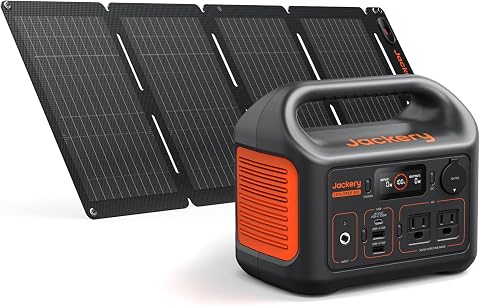
The Jackery Explorer 300 is a lightweight portable power station with 292Wh capacity and 300W AC output for camping, travel, and backup power. It provides multiple output options for laptops, cameras, drones, and other devices while supporting convenient solar charging.
Pros:
- Lightweight 7.5 lb design with integrated handle improves portability.
- Supports charging for up to six devices with AC, USB-C, USB-A, and car outputs.
- Long-life LiFePO4 battery offers over 4,000 charge cycles.
- Can recharge to 80% in 7.5 hours with the included 40W solar panel.
Cons:
- Included 40W panel recharges more slowly than higher-wattage solar options.
- 300W continuous output may not support larger appliances.
- Power station and solar panel may ship separately.
Best for: Travelers whose plans make room for a generator and solar panel.
Not ideal for: Packers who need a compact charging setup.
Bottom line: Bring this paired setup when its listed capacity, output, and carrying needs fit your itinerary.
Travel Adapters
A travel adapter is worth considering when the outlets on your trip differ from the plugs your devices use. The Anker Nano 100W Universal Travel Charger with Smart Display is the pick for this slot. Its product name highlights universal travel use, 100W, and a smart display, but you’ll still need to confirm it suits your destination and devices. Check destination compatibility before you pack it.
One common mistake is treating a travel charger as a guarantee that every device will work everywhere. Look up the outlet or plug requirements for your destination and compare them with the charger’s specifications. Check the charging needs of each device, too, particularly if you plan to use several connections at once. A smart display may be useful to you, but the core fit is whether the charger’s supported plugs and output align with your setup. Verify the supported outlets and device needs in the product details.
What to look for:
- Confirm supported plug types for your destination.
- Check the listed 100W output against device requirements.
- Verify whether its connections suit all devices you plan to charge.
- Review how the smart display fits your charging routine.
- Check destination outlet requirements before departure.
Anker Nano 100W Universal Travel Charger with Smart Display

This compact travel charger has built-in US, UK, and EU plugs and supports Type A, C, and G outlets across a 100–275V input range. It charges up to four devices through three USB-C ports and one USB-A port, with up to 100W from USB-C1 or USB-C2 when used individually.
Pros:
- Charges up to four devices at once.
- USB-C1 or USB-C2 can deliver up to 100W individually for laptop charging.
- Built-in US, UK, and EU plugs support Type A, C, and G outlets.
- LCD shows voltage zone, power output, and temperature.
Cons:
- Does not support Type I outlets, including those used in Australia and New Zealand.
- It is not a battery and requires an outlet.
Best for: Travelers whose destination and devices match its supported connections.
Not ideal for: Anyone whose destination or devices need unsupported plugs or charging specs.
Bottom line: Choose it after confirming destination plug support and compatibility with your devices.
Charging Cables
Charging cables can make a multi-device setup easier to organize, especially when your devices use different connections. The USB-A/USB-C to 4 USB-C Charging Splitter Cables, 2-Pack, 4 ft lists both USB-A and USB-C input options, four USB-C connections, two cables, and a four-foot length. Map your devices to the cable ends before deciding whether this design fits your kit.
A frequent mistake is assuming that a splitter can charge every connected device in the way you expect. Check the cable’s supported input and output connections, and review any limits or charging guidance provided by the seller. Confirm that four feet is a useful length for your usual setup and that your power source has the matching USB-A or USB-C connection. If you need a different device connector, this cable’s listed USB-C outputs may not suit that device. Confirm each connection and length before relying on the splitter.
What to look for:
- Check whether the input end matches your power source.
- Confirm each device can use a USB-C output.
- Review charging guidance for connecting multiple devices.
- Decide whether four feet suits your setup.
- Consider whether both cables in the 2-pack match your needs.
USB-A/USB-C to 4 USB-C Charging Splitter Cables, 2-Pack, 4 ft

This 4-in-2 splitter cable connects to USB-A or USB-C charging adapters and provides four USB-C connectors for charging multiple devices at once. It supports up to 3.1 A output, QC 3.0, and USB 2.0 data transfer up to 480 Mbps.
Pros:
- Can charge up to four USB-C devices simultaneously
- Works with USB-A and USB-C charging adapters
- Braided cable with reinforced strain relief
- Supports QC 3.0 and USB 2.0 data transfer
Cons:
- Maximum output is 3.1 A, shared across connected devices
- The product description advises using a fast charger or original wall charger
Best for: Travelers charging several USB-C devices from a compatible source.
Not ideal for: People whose devices need output connectors other than USB-C.
Bottom line: Pick the set if its input, four USB-C outputs, and length work for your devices.
Power Strips
A power strip can help organize charging when you expect to use an outlet for multiple devices. The Anker Prime 6-in-1 Charging Station, 140W Travel Power Strip with USB- is the named pick for this slot. Because the product name ends after “USB-,” check the full listing to confirm the complete description, connections, and specifications before you make it part of your travel plan. Confirm the full product details first.
A common buying mistake is choosing a strip based on the number of connections alone. Check how many outlets and USB connections it actually provides, whether those connections match your devices, and how the listed 140W relates to your intended use. Consider whether the strip is appropriate for your destination’s outlets and how it will fit in your luggage. If you plan to use a travel adapter with it, verify that the combination is supported. Check outlet compatibility and device connections for your whole charging setup.
What to look for:
- Find the complete product name and listing details.
- Confirm the actual mix of outlets and USB connections.
- Check whether the listed 140W fits connected device needs.
- Verify destination outlet compatibility.
- Consider luggage space and any adapter requirements.
Anker Prime 6-in-1 Charging Station, 140W Travel Power Strip with USB-C and USB-

The Anker Prime Charging Station is a compact 6-in-1 power strip featuring 2 AC outlets, 2 USB-C ports, and 2 USB-A ports, supporting fast and wide voltage charging. Powered by GaN technology, it delivers up to 140W for quick device charging and includes smart monitoring and protection features.
Pros:
- Supports fast charging with 140W power output
- Compact and sleek design suitable for travel and desktop
- Multiple ports for charging various devices simultaneously
- Smart protection and monitoring features
Cons:
- Not a wireless charging pad or portable battery
- Limited to wired connections only
Best for: Travelers who need a shared charging point and can confirm its connections.
Not ideal for: Anyone who can’t verify the complete product specifications.
Bottom line: Review the complete listing and destination compatibility before adding it to your kit.
Rechargeable Headlamps
A rechargeable headlamp can be a useful item to consider when your itinerary calls for hands-free light. The Nitecore HC75 UHE USB-C Rechargeable Headlamp is the pick for this checklist slot, and its name specifies USB-C recharging. Consider whether a headlamp suits the activities you have planned and whether USB-C fits the charging gear you’ll carry. Match the light to your itinerary and charging setup.
A common mistake is packing a light without checking how it recharges or whether you have a compatible cable and power source. Confirm the headlamp’s charging details in the product listing, then make sure USB-C charging fits your existing kit. Also consider how you expect to wear or carry it during your activities; check the product information for fit details and any features you need. Don’t assume that the product name answers every question about use or compatibility. Check the charging method and fit before you go.
What to look for:
- Confirm USB-C charging fits your cables and power source.
- Review the product listing for fit and use details.
- Consider whether hands-free light suits your itinerary.
- Check what charging accessories the headlamp requires.
- Make sure its charging needs fit the rest of your kit.
Nitecore HC75 UHE USB-C Rechargeable Headlamp

The Nitecore HC75 UHE headlamp delivers up to 3000 lumens with a 209-yard beam and stepless adjustable focus for flood, spot, or mixed lighting. It offers five white-light levels, two red-light modes, USB-C charging, and a lockout mode.
Pros:
- Adjustable focus supports flood, spot, and mixed lighting
- Includes white and red light modes
- USB-C charging with a power indicator and lockout mode
- Anodized aluminum construction
Cons:
- Maximum runtime is listed as 4 hours
- Requires a nonstandard 21700 battery
Best for: Travelers whose activities call for a USB-C rechargeable headlamp.
Not ideal for: People who don’t need a headlamp or can’t support USB-C recharging.
Bottom line: Add it when hands-free light fits your plans and its charging method fits your kit.
Build your kit in the order that solves your biggest charging need: first choose a power source that matches your devices, then add the cables or adapter needed to connect them. Consider the solar setup or power strip only if their size and connections make sense for your itinerary. Prioritize the essentials you’ll use on this trip.
You don’t need every item on this checklist to travel prepared. Review the devices you’re bringing, verify their connections, and pack the smallest set of compatible gear that covers your plans. A little checking before departure can make your charging setup easier to use once you’re on the road. Keep the checklist practical and enjoy the trip.